 Storemast
Feature
TestFlight builds for every app, before they expire
TestFlight builds expire 90 days after upload. With several apps, it's easy to miss one until a tester tells you. The Testing tab keeps them all in view.
The Testing tab
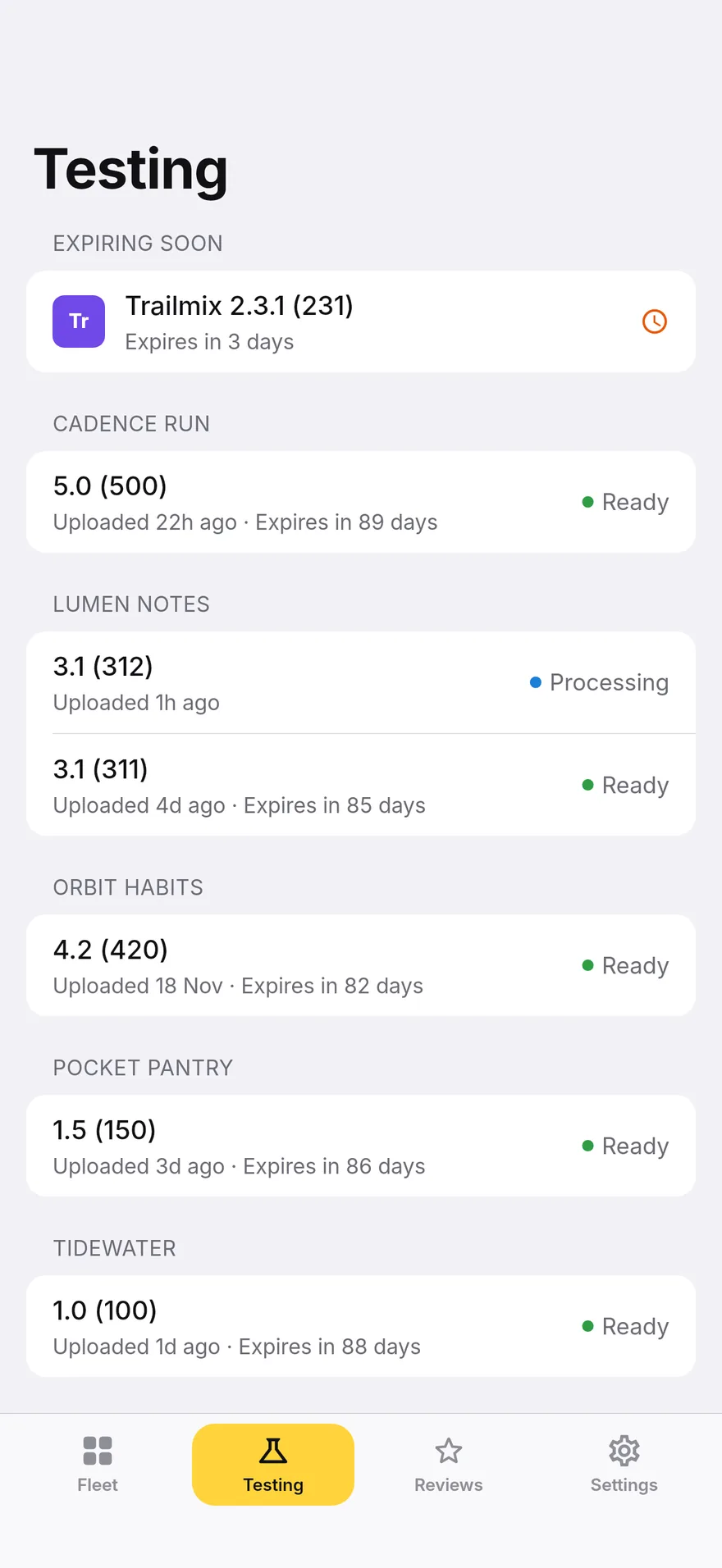
- Expiring soon at the top: every build with 7 days or less left, from any app, with how long it has.
- Each app's newest builds below, with version and build number, when it was uploaded and the days left.
- A state for each build: Processing, Ready, Failed or Expired.
Processing builds show up straight after upload, so you can see when Apple has finished with a build without refreshing App Store Connect on your Mac.
Why expiry catches people out
A TestFlight build is available for 90 days after you upload it. If your team or beta testers rely on one build for a while, for example a long beta or a client who checks in now and then, it can quietly reach day 90. When it expires, testers can't install it any more. The TestFlight expiry guide explains what happens and how to stay ahead.
What Storemast doesn't do
Storemast shows builds; it doesn't upload them, manage tester groups or submit builds for beta review. Do those in Xcode, your CI or App Store Connect.
The app preview
Questions
How long do TestFlight builds last?
90 days from upload. After that the build expires and testers can no longer test it. Upload a new build to keep testing.
Does Storemast notify me before a build expires?
Storemast doesn't send push notifications yet. Builds with 7 days or less left are listed at the top of the Testing tab under Expiring soon.
Can I upload or start builds from Storemast?
No. Builds are uploaded from Xcode or your CI as usual. Storemast shows them once they reach App Store Connect.