 Storemast
Guide
App Store ratings: how they work and how to ask for them
By the Storemast team · Last updated
TL;DR
Each App Store storefront shows its own summary rating: the average and count of star ratings from that country or region. When you release a version you can choose to reset the summary; written reviews stay. To ask for ratings inside the app, use Apple's review prompt (requestReview); the system decides whether to show it and, as Apple documents, limits it to three times in 365 days per user. Ask after a success, never from a button, and never reward ratings. Then answer the reviews that come in.
Your star rating shows next to your app's name almost everywhere on the App Store, including search results. It's one of the strongest reasons people do or don't tap through. You can't control what people think, but you can control when you ask, how you respond, and whether one bad release drags your average down for years. Here's how ratings work and how to handle them well.
How App Store ratings work
- Ratings and reviews are different. A rating is one to five stars. A review is a rating with a title and text. Both count towards your average.
- Per storefront. Each country or region shows its own summary rating: the average and the number of ratings there. Your rating in Germany can differ from your rating in the US.
- Per app, across versions. The summary covers all versions until you reset it.
- Shown everywhere. Search results, the product page and featured placements show the stars and count.
- Visible to you in App Store Connect, with reviews filterable by territory, and through the App Store Connect API.
Resetting the summary rating
When you prepare a version, its release options let you reset the summary rating when that version is released. The average and count start again from ratings given after the release. Written reviews stay on your product page.
| Reset when… | Don't reset when… |
|---|---|
| Old ratings are about problems the new version fixes | Your average is good and the count builds trust |
| The app has been rebuilt and old ratings describe a different app | You only have a few ratings to begin with |
| You're ready to ask happy users for new ratings straight away | The new version hasn't proved itself yet |
A reset leaves your product page with no average until new ratings arrive, which can look empty. It's a once-in-a-while decision, not a routine. Combine it with phased release so you can pause if the new version has problems.
Asking for ratings inside your app
The way to ask is Apple's own review prompt. In SwiftUI it's the requestReview environment action; UIKit apps call StoreKit's AppStore.requestReview(in:) on recent iOS versions, or the older SKStoreReviewController.requestReview(in:), with the current window scene:
import StoreKit
import SwiftUI

struct ExportFinishedView: View {
    @Environment(\.requestReview) private var requestReview
    let exportsCompleted: Int

    var body: some View {
        Label("Export finished", systemImage: "checkmark.circle")
            .task {
                // Ask only after a few successful exports, once the result is on screen.
                guard exportsCompleted >= 3 else { return }
                try? await Task.sleep(for: .seconds(2))
                requestReview()
            }
    }
}
Apple documents a few things about how it behaves:
- The system decides. Calling the API doesn't guarantee a prompt. Apple says the system limits it to three times within a 365-day period per user.
- Users can turn it off for all apps in Settings.
- Development builds always show it; TestFlight builds never do. So you can't measure it in a beta.
- People rate without leaving your app, and can add a written review in the same sheet.
In the example, the app asks after a moment on a success screen, not when someone taps a button. Apple advises against calling the API in direct response to a user action such as a button tap, because the prompt might not appear. For a "Rate this app" button, open your App Store page instead, with ?action=write-review added to your app's App Store URL.
When to ask
With only a few chances a year, timing matters more than anything.
- After a success. The user finished something: an export, a workout, a level, a booking.
- After real use. Wait until someone has used the app several times, over more than one day.
- Not in the middle of a task, not on launch, and not right after an error.
- Not too often. Track when you last asked, and skip people who already rated this version.
- After a fix lands, people who hit the bug are often willing to update their rating.
What's not allowed
- Custom review prompts. Guideline 5.6.1 asks you to use Apple's API and doesn't allow your own rating dialogs.
- Rewards. No coins, features or discounts in exchange for a rating.
- Making it a condition. Don't make people rate or review the app to use a feature or get content.
- Fake ratings. Buying ratings or rating your own app breaks Apple's rules and can lead to removal from the Apple Developer Program.
Replying to reviews
You can post one public response to each written review, and edit or delete it later. A good reply can lead the reviewer to update their rating, and it shows everyone else that someone is listening. Answer bug reports and low ratings first, keep it short and specific, and edit your reply when the fix ships. Our guide how to reply to App Store reviews has templates.
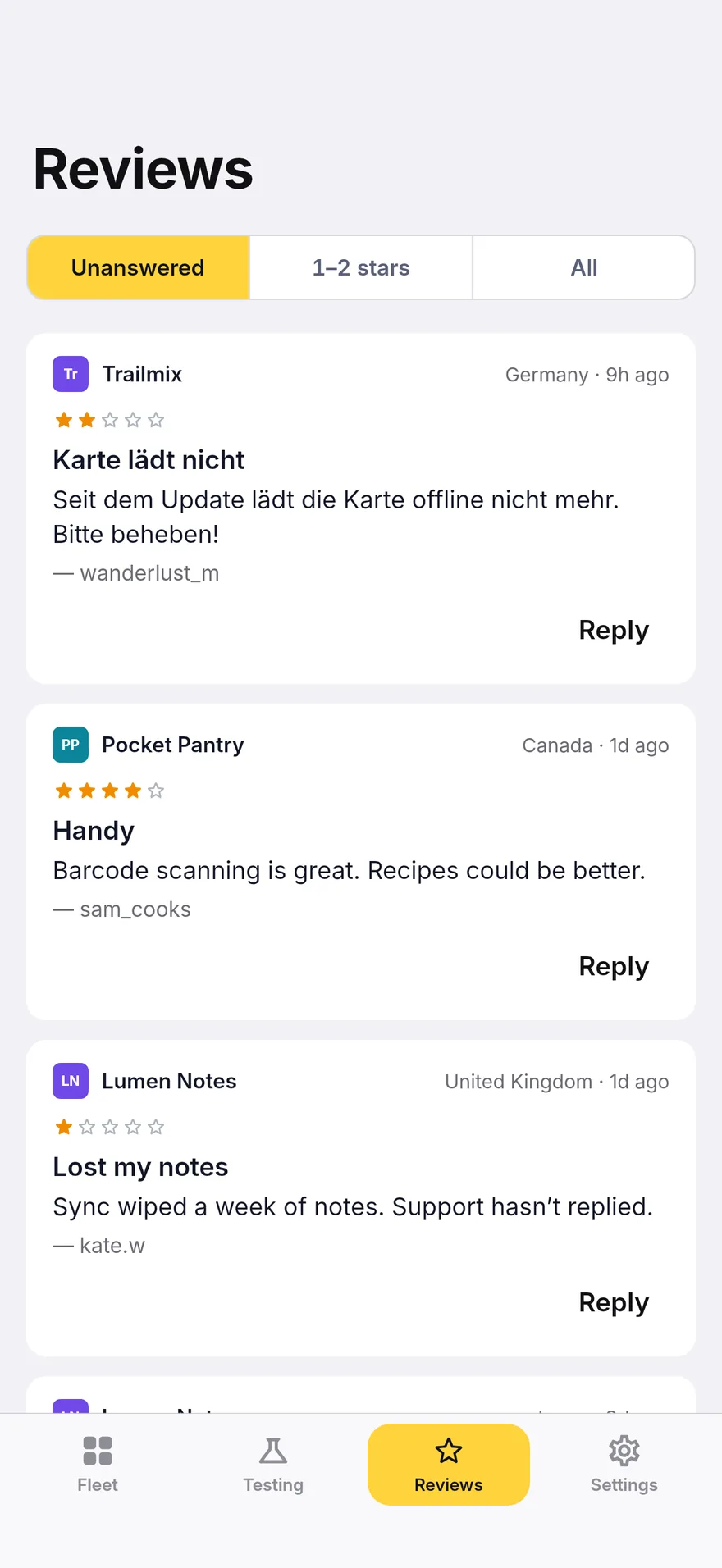
With several apps, reviews are spread across App Store Connect pages. Storemast collects them from all your apps into one list with Unanswered and 1–2 stars filters, and lets you reply from your iPhone.
Reporting a review
You can't delete reviews, but if one breaks Apple's rules (abusive, spam, off-topic, or personal information), you can report a concern on it in App Store Connect's Ratings and Reviews section. Apple decides what happens. A review you simply disagree with isn't a reason to report: reply instead.
Ratings as a signal
A sudden drop in a storefront usually has a cause: a crash on one device, a confusing change, a translation problem. Read the new reviews from that country, check crash reports for the latest version, and if it's a bad update, ship a fix and say so in your What's New. Ratings are part of how your product page converts, so they're part of App Store optimization too.
Questions
How are App Store ratings calculated?
Each storefront shows the average of the star ratings people in that country or region gave your app, with the number of ratings. Apple shows the summary; it doesn't publish exactly how it's computed beyond that.
Can I reset my App Store rating?
Yes, when you release a new version. In the version's release options, App Store Connect lets you reset the summary rating, so the average starts again from new ratings. Written reviews stay visible. Think twice if your current average is good.
How often can I show the in-app rating prompt?
Apple documents that the system shows the prompt at most three times in a 365-day period for each user. You can call the API more often, but the system decides whether anything appears.
Why doesn't the rating prompt appear in TestFlight?
Apple's documentation says the prompt never appears in apps distributed through TestFlight. In development builds it always appears, so you can test the layout.
Can I use my own rating pop-up?
Not to collect App Store ratings. Apple's guideline 5.6.1 asks you to use its API to prompt for reviews and doesn't allow custom review prompts. A link that opens the App Store's write-a-review page is fine, for example in Settings.
Can I remove a bad review?
No. You can reply to it, and you can report a concern to Apple from App Store Connect if a review breaks Apple's rules, for example if it's abusive or spam.