 Storemast
Guide
How to reply to App Store reviews
By the Storemast team · Last updated
TL;DR
You can post one public response to each App Store customer review, from App Store Connect, its API or a tool like Storemast. Editing replaces your response; you can also delete it. Responses show under the review once Apple publishes them, which can take a while. The reviewer can be notified and may update their review. Be short, specific and human.
Reviews are the most public feedback your app gets, and a reply is the only way to answer in the same place. A thoughtful reply can turn a one-star complaint into an updated review, and it shows everyone else reading that someone is listening. Here's how replies work on the App Store, and how to write good ones.
How developer responses work
- One response per review. Each customer review can carry one developer response.
- Edits replace it. Changing your response swaps the text; there's no thread or history shown to readers.
- You can delete it. The review then shows without a response.
- It's public. Your response shows under the review on the App Store, in the country where the review was written.
- It isn't instant. Apple publishes responses after you send them, which can take some time.
- Reviewers can respond. Apple can let the reviewer know you replied, and they can update their review.
- Length: the API accepts up to 5,970 characters. Use far fewer.
Where to reply
In App Store Connect
Open your app, then Distribution › Ratings and Reviews (the exact place moves now and then). Find the review, choose Reply, write your response and submit. You can edit or delete it from the same place.
From your iPhone with Storemast
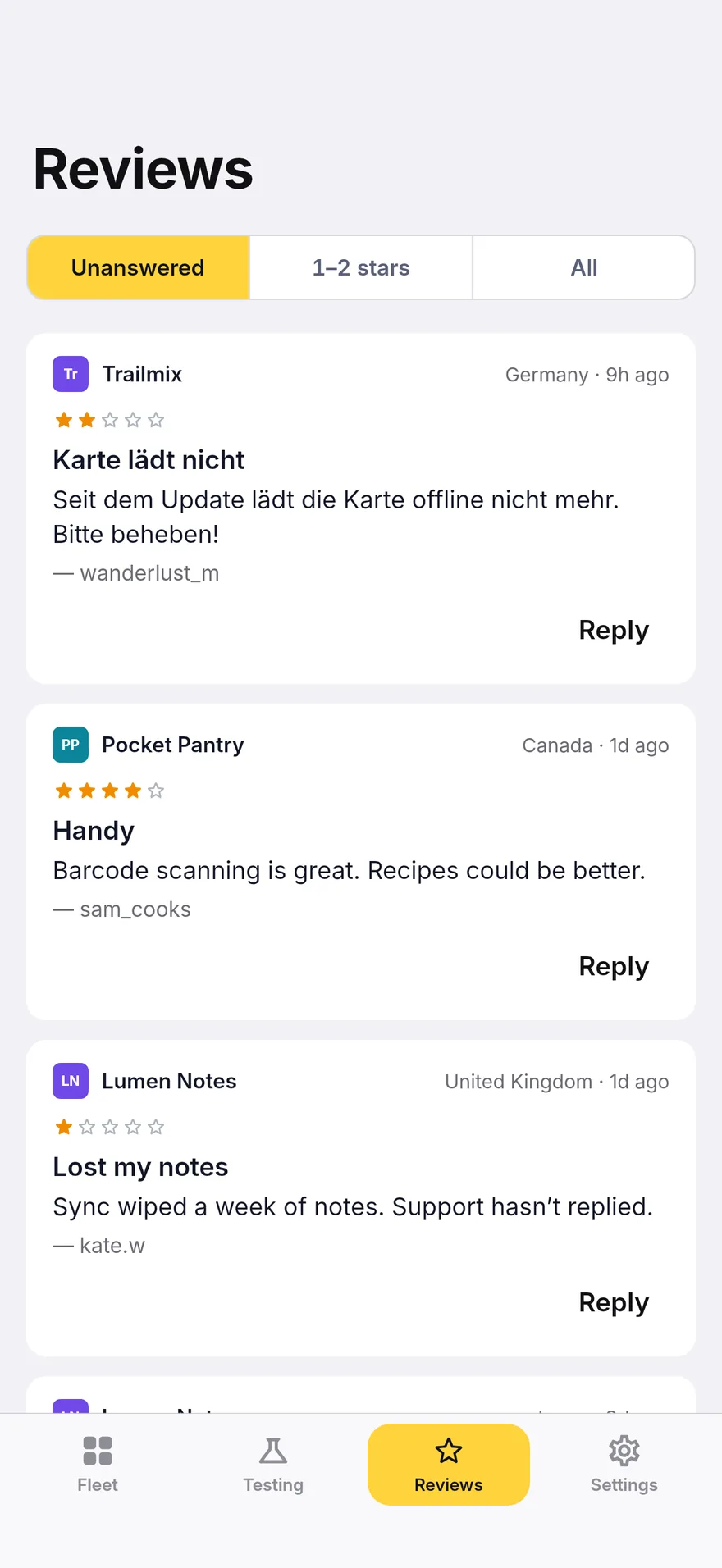
- Open the Reviews tab. It lists reviews from all your apps, newest first.
- Tap Unanswered or 1–2 stars to see what needs a reply.
- Tap Reply, write your response and send. Storemast asks for Face ID first.
- Your reply shows as publishing until Apple publishes it. Tap it later to edit or delete.
The key you connect needs a role that can reply: Customer Support, App Manager or Admin. See how to create an App Store Connect API key.
Which reviews to answer first
- Bug reports, especially ones that mention a version or device. Reply when you know what's going on, and again (by editing) when the fix ships.
- 1–2 star reviews where the reviewer misunderstood something you can explain in a sentence.
- Feature requests, so the person knows it was heard.
- Glowing reviews, when you have time. A short thank-you is enough.
Skip reviews that are abusive or have nothing to respond to. Arguing in public never looks good, even when you're right.
What makes a good reply
- Short. Two to four sentences. People skim.
- Specific. Refer to what they said. Copy-paste replies read as copy-paste.
- In their language. Reply in the language of the review where you can.
- Useful. A workaround, a version number with the fix, or a way to reach support.
- Calm. Thank them, own the problem if it's yours, and don't blame Apple, the user or their device.
- Safe. Never ask for passwords, payment details or personal data in a reply. Point them to your support email instead.
Reply templates
Use these as starting points and make each one specific to the review.
Bug you're fixing
Thanks for letting us know, and sorry about the [problem]. We found the cause and
version [x.y] fixes it; it's rolling out now. If it still happens after updating,
please email [support address] and we'll look into it.
Bug you can't reproduce
Sorry, that's not how [app] should behave. We haven't been able to reproduce it yet.
Could you email [support address] with your iPhone model and iOS version? It'll help
us fix it quickly.
Misunderstanding
Thanks for the review! You can [do the thing] from [place in the app]. We'll make it
easier to find in a future update.
Feature request
Thanks for the idea. [Feature] is on our list; we can't promise a date, but reviews
like yours help us decide what comes next.
Positive review
Thank you, that made our day. If there's anything you'd like to see next, we're at
[support address].
After the fix ships
When an update fixes the problem a reviewer described, edit your reply to say which version fixed it. Editing replaces the old text, so the review now shows the up-to-date answer. Many people update their rating when they see the problem was taken seriously. Mention the fix in your What's New too.
Make it a habit
The teams with the best review pages answer little and often rather than in a monthly batch. With several apps that's hard from App Store Connect alone, because reviews live under each app. A single list with an Unanswered filter makes it a two-minute job on your phone: that's what Storemast's Reviews tab is for.
Questions
Can I reply to every App Store review?
You can respond to customer reviews written on the App Store for your apps, one response per review. Ratings without written text have nothing to reply to.
Can I reply more than once to the same review?
No. Each review can have one developer response. If you edit it, the new text replaces the old one.
Are App Store review replies public?
Yes. Your response appears under the review on the App Store, where anyone reading reviews can see it.
Why doesn't my reply show yet?
Apple publishes responses after you submit them, and that can take some time. In Storemast the reply shows as publishing until Apple reports it as published.
Can I ask the reviewer to change their rating?
You can invite them to update their review after a fix, but don't pressure them or offer anything in exchange. Apple's guidelines don't allow manipulating ratings or reviews.
Who on my team can reply?
People with the Account Holder, Admin, App Manager or Customer Support role, and API keys with those roles.