 Storemast
Guide
Phased release on the App Store, explained
By the Storemast team · Last updated
TL;DR
Phased release rolls an iOS update out to people with automatic updates over 7 days: 1%, 2%, 5%, 10%, 20%, 50%, then 100%. Anyone can still update by hand from the App Store at any time, and new downloads get the new version. You can pause for up to 30 days in total and release to everyone whenever you like.
Every update is a risk: a crash on one device model, a server change that doesn't hold up, a login screen that loops. Phased release is Apple's way to limit the blast radius. Instead of pushing a new version to every user at once, the App Store hands it to a growing share of users over a week, and you can stop the rollout if something goes wrong.
The 7-day schedule
Once a version with phased release is released, the App Store offers it to a percentage of users with automatic updates turned on, rising each day:
| Day | Share of users with automatic updates |
|---|---|
| 1 | 1% |
| 2 | 2% |
| 3 | 5% |
| 4 | 10% |
| 5 | 20% |
| 6 | 50% |
| 7 | 100% |
The percentages are of users who have automatic updates on, and Apple picks them. You can't choose who gets the update first or change the percentages.
Who gets the update, and who doesn't
- Automatic updates follow the schedule above. This is the only thing phased release controls.
- Manual updates are not held back. Anyone who opens the App Store and taps Update gets the new version on day 1.
- New downloads always get the newest version.
So phased release is a brake, not a wall. On day 1 your new version may reach more than 1% of users, because keen users update by hand. Plan for that: a phased release limits the damage of a bad update; it doesn't hide it.
How to turn it on
Phased release is set per version in App Store Connect, while you prepare the version for submission. In the version's page, under Version Release, choose how the version is released (manually, automatically, or after a date) and, under Phased Release for Automatic Updates, choose to release the update over a 7-day period. Then submit for review as usual.
Phased release starts when the version is released: straight after approval if you chose automatic release, at your date if you scheduled it, or when you press Release if you chose manual release (the version waits as Pending Developer Release until then). With manual release you can release from your phone: see how to release an app update from your iPhone.
Storemast doesn't turn phased release on or off yet. Set it in App Store Connect before release; after release, Storemast can pause, resume or complete it.
Pausing a rollout
If crash reports spike or reviews start mentioning a bug, pause. While paused:
- the update stops reaching more users through automatic updates,
- users who already updated keep the new version (there's no rollback on the App Store), and
- anyone can still update by hand.
Apple allows a phased release to be paused for up to 30 days in total, and you can pause more than once. When you resume, the rollout carries on with the remaining days. Use the pause to ship a fix: submit a new version with the fix, and once it's approved, release it.
Releasing to everyone
If the numbers look good and you don't want to wait for day 7, choose Release to All Users in App Store Connect (in Storemast: Release to everyone now). All users with automatic updates then get the update. This can't be undone.
Phased release from your iPhone
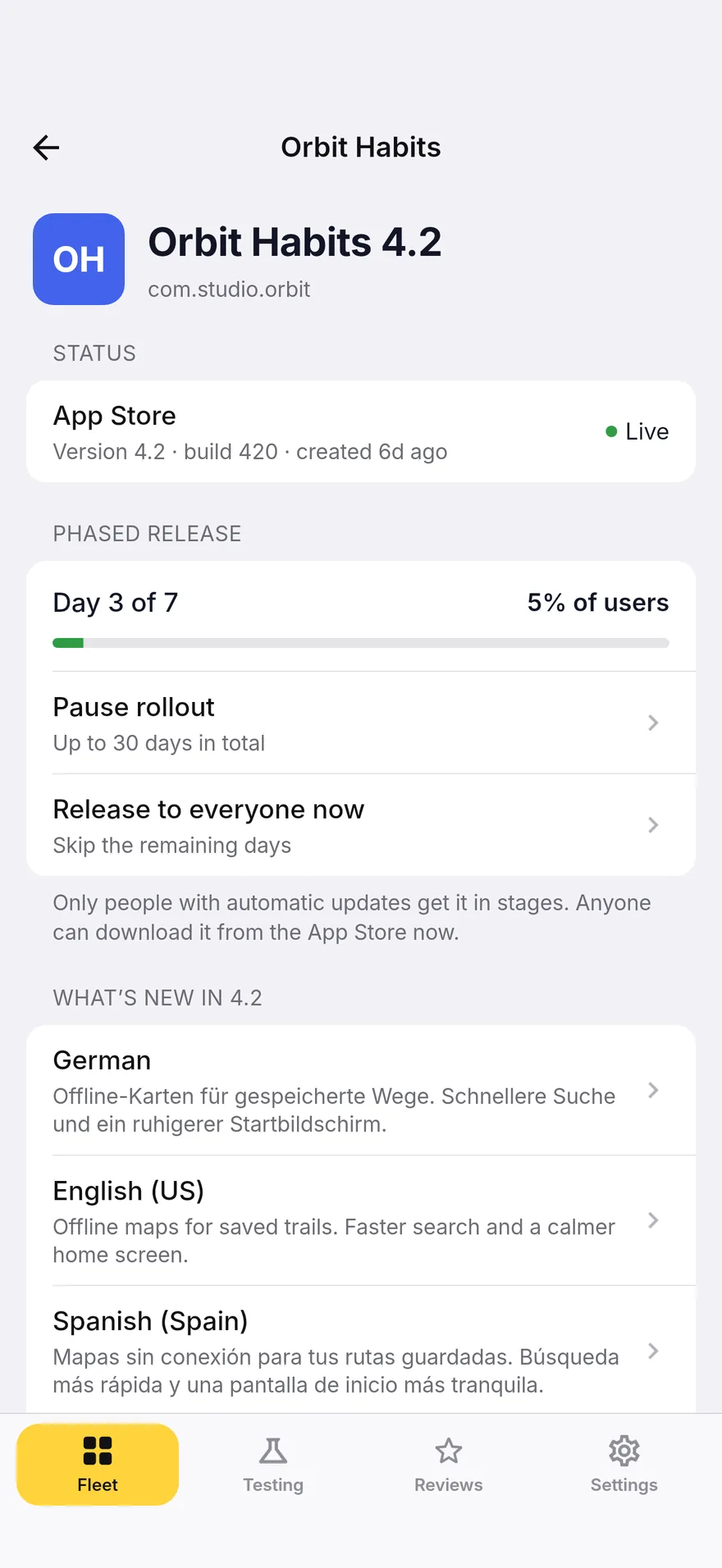
A rollout is something you check on: a quick look at the day and your crash reports each morning. Storemast puts that on your phone:
- See the day of the rollout and the current percentage, with a progress bar.
- Pause, resume or release to everyone; each asks for Face ID first.
- Spot every app mid-rollout from the Fleet screen.
When to use phased release
Most teams leave it on for every update. It costs a few days of reach and protects you from the worst outcomes. Consider skipping it when:
- the update fixes a serious bug that everyone needs now (you can also start phased and release to everyone once it looks stable),
- the update must land with a server change that breaks old versions, or
- you're coordinating a launch date and want everyone on the new version together.
A simple rollout routine
- Day 1–2: watch crash reports and new reviews closely. Most crash-on-launch problems show up here.
- Day 3–4: compare crash-free rates with the previous version. Check your support inbox.
- Day 5–6: if everything is calm, consider releasing to everyone.
- Any day: if something's wrong, pause, fix, submit the fix, and release it.
Questions
Does phased release affect new downloads?
No. People who download the app for the first time get the newest version. Phased release only paces automatic updates for people who already have the app.
Can users get the update before their turn?
Yes. Anyone can open the App Store and update the app by hand during a phased release.
How long can I pause a phased release?
Apple allows up to 30 days of pausing in total for one phased release. You can pause and resume more than once within that.
Can I turn on phased release after the version is live?
No. Phased release is chosen while you prepare the version, before it's released. Once a version is out, you can only pause, resume or complete its rollout.
Is phased release available for the first version of an app?
Phased release is for updates: it paces automatic updates for existing users. A first release has no existing users to pace.
Can I manage a phased release from my phone?
Yes. Storemast shows the day and percentage of each rollout and lets you pause, resume or release to everyone from your iPhone, confirmed with Face ID.