 Storemast
Guide
Pending Developer Release: what it means and how to release
By the Storemast team · Last updated
TL;DR
Pending Developer Release means App Review has approved your version and it's waiting for you to release it, because you chose Manually release this version. Nothing happens until you press Release This Version in App Store Connect (or release it from a tool like Storemast). Apple doesn't publish a time limit. If phased release is on, the 7-day rollout starts when you release.
You submitted an update, App Review approved it, and instead of going live the version now says Pending Developer Release. That's not a problem: it's exactly what you asked for when you chose manual release. This guide explains what the status means, how it compares with automatic and scheduled release, how long a version can sit there, and how to release it from the web or your iPhone.
What Pending Developer Release means
Pending Developer Release is the status of an App Store version that has passed App Review and is waiting for the developer, you, to release it. It only appears when the version's release option is set to Manually release this version.
- The version is approved. Review is over.
- It's not on the App Store yet. Customers still get your current version.
- It stays there until you release it or reject it yourself.
In the App Store Connect API the same state is PENDING_DEVELOPER_RELEASE (in both appVersionState and the older appStoreState).
Manual, automatic or scheduled release
Each version has a Version Release setting, chosen while you prepare it for submission. It decides what happens after approval:
| Option | After approval | Status you'll see |
|---|---|---|
| Manually release this version | Waits until you release it. | Pending Developer Release |
| Automatically release this version | Released straight away. | Processing for Distribution, then Ready for Distribution |
| Automatically release this version after App Review, no earlier than a date | Released at your date and time, or on approval if that's later. | Pending Apple Release until the date |
Why choose manual? It separates approval from launch. You can submit early, then release when marketing is ready, when your server changes are live, when you're awake to watch crash reports, or simply not on a Friday evening. If review takes longer than expected you don't lose anything; if it's quick you're not forced to launch early.
Why choose scheduled? A fixed launch time with nothing to press. The catch: if approval comes late, the version goes out as soon as it's approved, which may not be when you're ready.
How long can a version stay in Pending Developer Release?
Apple doesn't publish a limit. Versions commonly wait days or a few weeks, and that's fine. Waiting much longer has practical costs:
- You can't move on. While a version is pending, you can't submit the next version of the app for the same platform alongside it.
- The world moves. Apple's SDK and agreement requirements, your backend and your App Store information can change. A version approved months ago may no longer be the one you want to ship.
- It blocks fixes. If a bug turns up in your live version, the fastest path is often to release or replace the pending version.
If a release is postponed indefinitely, consider rejecting the approved version and submitting a fresh one when you're ready.
How to release in App Store Connect
- Open the app in App Store Connect (Apps, then your app).
- Select the approved version in the sidebar under iOS App. Its status shows Pending Developer Release.
- Check what's going out: the build number, What's New, and whether phased release is on.
- Click Release This Version and confirm. The status moves to Processing for Distribution, then Ready for Distribution once it's live.
Releasing can't be undone. If phased release is on, you can still pause the rollout of automatic updates afterwards.
How to release from your iPhone
Approvals often land when you're away from your desk. You can sign in to App Store Connect in Safari on your phone, but the web layout is built for a big screen. Storemast is an iPhone app made for this moment:
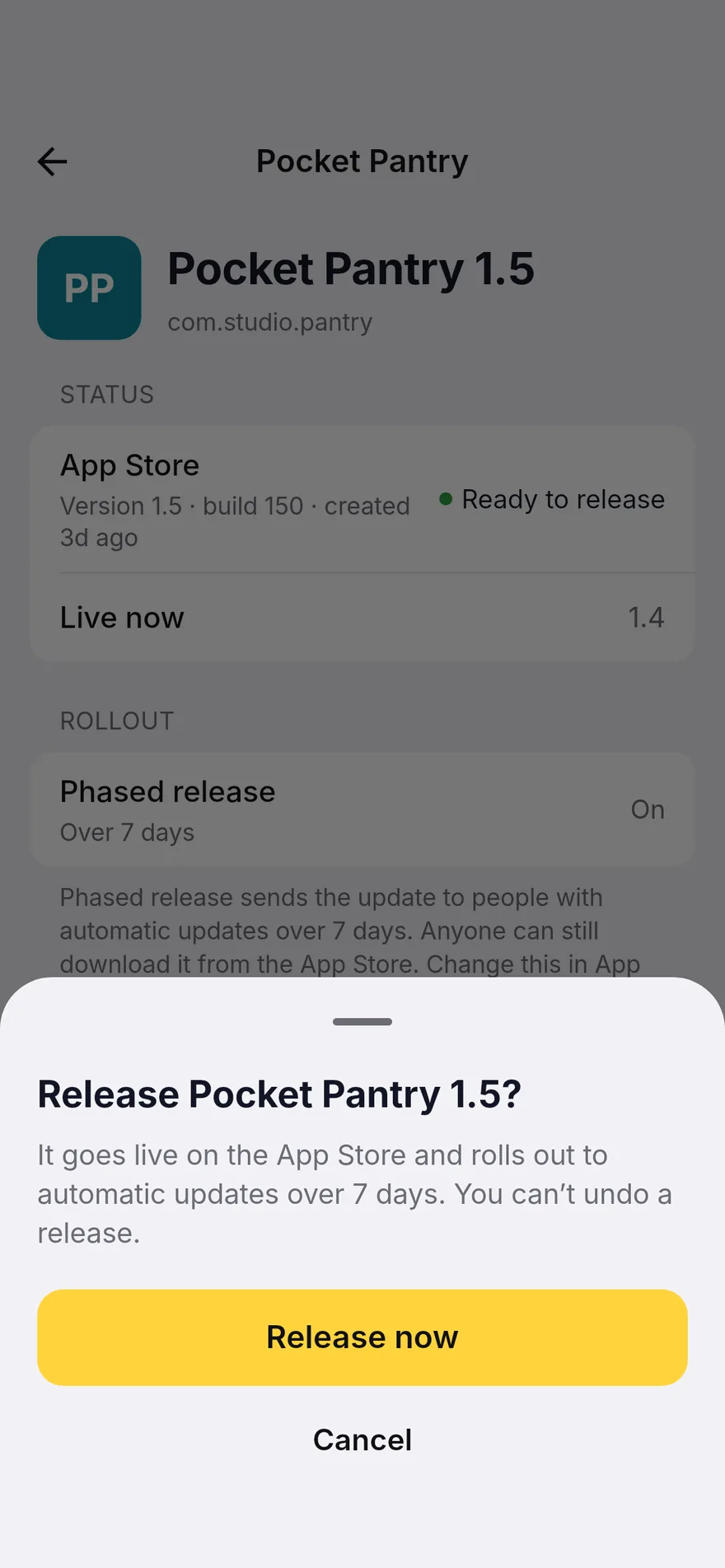
- Open Storemast. Approved versions from all your apps appear under Needs you on the Fleet screen as Ready to release.
- Open the app and check the build, What's New per language and the phased release setting.
- Tap Release now, read the confirmation sheet, and approve with Face ID.
Storemast connects with an App Store Connect team API key (App Manager role or higher to release) that stays in your iPhone's Keychain. The full walk-through is in how to release an app update from your iPhone.
Pending Developer Release and phased release
Phased release is chosen for the version before submission, and it does nothing while the version is pending. The 7-day schedule (1%, 2%, 5%, 10%, 20%, 50%, 100% of users with automatic updates) starts the moment you release. So manual release plus phased release gives you two controls: when the rollout begins, and how fast it reaches everyone. You can pause for up to 30 days in total or release to all users early.
Storemast doesn't turn phased release on or off yet: set it in App Store Connect before you submit. After release, Storemast can pause, resume or complete the rollout.
Changing your mind about an approved version
An approved version is locked: you can't swap its build or edit its screenshots. If you need to change something:
- On the version page in App Store Connect, choose to reject this version yourself. Its status becomes Developer Rejected.
- Make your change: choose a new build, edit metadata, change the release option.
- Submit it for review again. It goes back through the queue, so allow for review time.
Only do this if you need to. An approved version is worth keeping if all you want to change is the release timing.
Releasing through the API
If you automate releases, the App Store Connect API releases a pending version with a POST to /v1/appStoreVersionReleaseRequests that names the appStoreVersion. The key needs a role that can release (App Manager or Admin). That's the request Storemast makes when you tap Release now. More in the App Store Connect API guide.
Common questions in practice
- “It's been approved, why isn't it on the App Store?” Check the status. Pending Developer Release needs you; Pending Apple Release is waiting for your scheduled date; Processing for Distribution just needs a little time.
- “I released, but I can't see the update.” After Ready for Distribution, the new version can take a while to reach every storefront and device, and with phased release automatic updates are paced over 7 days. Updating by hand in the App Store gets it sooner.
- “Pending Contract instead?” The version is approved, but the agreements, tax or banking information in App Store Connect need attention. The Account Holder should check the Business section.
Questions
What does Pending Developer Release mean?
Your version passed App Review and is approved, but it isn't on the App Store yet. You chose to release it manually, so App Store Connect is waiting for you to press Release.
How long can an app stay in Pending Developer Release?
Apple doesn't publish a limit, and versions commonly wait days or weeks. Don't leave it for months: agreements, SDK requirements or your own plans can change, and you may end up submitting a new version anyway.
Is Pending Developer Release the same as approved?
Yes. It's an approved version that hasn't been released. Pending Apple Release is the equivalent when Apple will release it for you, for example at a scheduled date.
Can I change the build or metadata while it's Pending Developer Release?
Not on the approved version. If you need a different build or different screenshots, reject the approved version yourself (it becomes Developer Rejected), make the change and submit it for review again.
Can I submit a new version while one is Pending Developer Release?
Not alongside it for the same platform. Release the approved version first, or remove it, then create and submit the next version.
Does phased release start while the version is pending?
No. Phased release starts when you release the version. Until then, no users get the update, whether they use automatic updates or not.
Can I release a Pending Developer Release version from my phone?
Yes. App Store Connect works in a mobile browser, and Storemast lists approved versions from all your apps under Needs you and releases them with Face ID.