 Storemast
Guide
Waiting for Review on the App Store: what it means
By the Storemast team · Last updated
TL;DR
Waiting for Review means your version is submitted and in Apple's queue, but no reviewer has started on it. Apple says most submissions are reviewed within 24 hours; there's no guaranteed time. The version's information is locked while it waits. To change it, remove it from review (it becomes Developer Rejected), edit, and submit again, which puts it at the back of the queue.
You've pressed Submit for Review, and App Store Connect now shows Waiting for Review next to your version. From here, most of the work is Apple's. But it helps to know what this status allows, what it locks, and what your options are if you need to change something or the wait drags on.
What Waiting for Review means
Waiting for Review is the status of a version that has been submitted to App Review and is in the queue, with no reviewer working on it yet. When a reviewer starts, it changes to In Review. In the App Store Connect API, the state is WAITING_FOR_REVIEW.
A submission can include more than the version: in-app purchases, subscriptions, custom product pages or in-app events you add to the same submission are reviewed with it. They show their own statuses.
| Before | Now | Next |
|---|---|---|
| Prepare for Submission or Ready for Review | Waiting for Review | In Review, then approved (Pending Developer Release or straight to release) or Rejected |
The whole path, rejections included, is in every App Store version status explained.
How long Waiting for Review usually lasts
Apple says most submissions are reviewed within 24 hours. It doesn't guarantee a time or publish queue lengths, so treat that as a typical case, not a promise. Most of that time is usually spent in Waiting for Review; In Review itself is often shorter.
Expect a longer wait for:
- the first version of a new app,
- apps with accounts, payments, user-generated content or sensitive categories,
- busy periods: the run-up to the end-of-year holidays, and the weeks around a major iOS release, and
- a resubmission after a rejection, which goes through the queue again.
For what slows reviews and how to plan release dates, see how long App Store review takes.
What you can and can't change while waiting
| Item | While Waiting for Review |
|---|---|
| Build | Locked. Remove from review to choose another. |
| Screenshots, description, keywords, What's New | Locked for this version. |
| App Review Information (demo account, notes) | Treat as locked; keep the demo account working, as the reviewer will use what you gave. |
| Pricing and availability | Set at app level, not per version, so it can be changed separately. |
| TestFlight testing | Carries on as usual. You can upload and test other builds. |
| Your backend | Yours to manage, but don't break what the reviewer will test. |
Apple adjusts what's editable from time to time. If a field is greyed out in App Store Connect, it's locked for this submission.
The one thing to protect above all: the reviewer's way in. If your app needs a sign-in, a demo account that expires or a server that's down during review is a common reason for rejection.
How to cancel or remove a version from review
If you spot a bug, used the wrong build, or need to change the listing, you can pull the version back. While it's Waiting for Review (and in many cases In Review), App Store Connect lets you remove it.
- Open the app in App Store Connect and select the version that's waiting.
- Find the submission. On the version page, or in the app's App Review section, open the submission that contains it.
- Choose Remove from Review (Apple may label it Cancel Submission for the whole submission) and confirm.
- Make your changes. The version is now Developer Rejected and editable again.
- Submit again when ready. It joins the queue as a new submission.
Removing a version from review is your decision, not a rejection by App Review. It does cost you your place in the queue, so only do it for changes that matter. For a typo in the description, it's often better to let the review finish and fix it in the next update.
If the wait is too long
- Check that nothing is waiting on you. Look for messages from App Review, a pending agreement in the Business section, or a build waiting for export compliance.
- Check Apple's status and news. Apple's developer news page announces holiday arrangements, and the System Status page shows App Store Connect outages.
- Request an expedited review if a critical bug fix or a dated event can't wait. Use the form on Apple's developer website (Contact Us › App Review › Request an Expedited App Review). Apple grants these at its discretion. Step by step: how to request an expedited review.
- Don't resubmit to “jump the queue”. Removing and resubmitting puts you at the back, not the front.
After Waiting for Review
- In Review: a reviewer is testing the app. Keep an eye on App Store Connect for questions.
- Approved: with automatic release it goes live; with manual release it becomes Pending Developer Release and waits for you; with a scheduled date it waits as Pending Apple Release.
- Rejected or Metadata Rejected: read the message, fix, and resubmit or reply.
Watching several apps at once
If you ship a handful of apps, it's easy to lose track of which ones are waiting, which are in review and which are approved. Storemast's Fleet screen on iPhone shows each app's in-progress version with a plain status (Waiting for review, In review, Rejected, Ready to release) and puts the ones that need you at the top. It reads the same statuses App Store Connect shows, through the App Store Connect API, using a team key that stays on your phone.
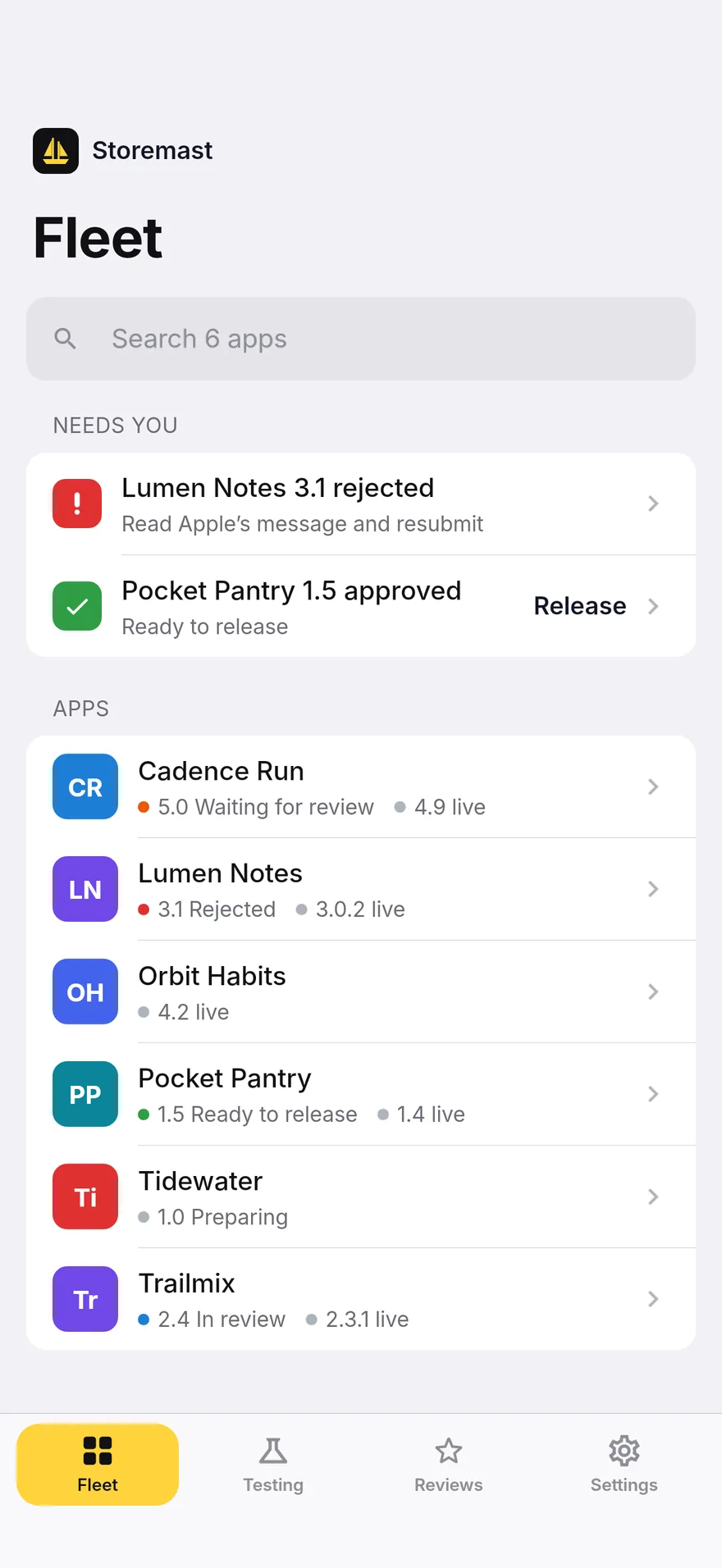
Storemast can't remove a version from review or show App Review's messages (those aren't in Apple's API), so for those you'll still open App Store Connect.
Questions
What does Waiting for Review mean on the App Store?
Your version has been submitted to App Review and is in the queue. A reviewer hasn't picked it up yet. When they do, the status changes to In Review.
How long does Waiting for Review take?
Apple says most submissions are reviewed within 24 hours, without guaranteeing it. New apps, busy periods such as the end-of-year holidays, and complex apps can wait longer.
Can I edit my app while it's Waiting for Review?
Not the submitted version: its build and App Store information are locked. Remove it from review, make the change and submit again. Some things outside the version, such as pricing and availability, can be changed separately.
Does removing an app from review lose my place in the queue?
Yes. When you submit again, the version joins the queue as a new submission.
Is Waiting for Review the same as In Review?
No. Waiting for Review is the queue; In Review means a reviewer is testing the app now. In Review is usually shorter, but it can include questions from App Review.
My app has been Waiting for Review for days. What can I do?
Check for messages from App Review and for anything else that needs you (agreements, export compliance). If a critical bug or a dated event makes the delay a real problem, request an expedited review from Apple.